Image
Pinned

As an aspiring digital seller, you’re probably feeling overwhelmed at your choices of what to sell. There are so many possibilities! But how do you narrow this down and decide what to sell? There are a few important considerations that I’ll walk you through to help you feel confident when choosing your product type and niche. While you can of course change this down the road, it is still important to not jump into this decision too quickly as it will have a huge impact on your shop’s future success.

But first, what is a digital product?

A digital product is one that your customer downloads and uses on their computer or mobile device, or sends to a printer.

They fall into broad types such as wall art, stationery and templates.

They also belong to a niche, such as wedding, business or travel, which aligns with your customer and their use case.

Within niches there are also subniches that get even more specific.

So with all this in mind, how do you choose your digital product?

Let’s break this down into 3 considerations:

  • Market demand — what are customers looking for?
  • Market saturation — what is the competition like?
  • Your skills and interests — what would you enjoy?


Venn diagram — Choosing a digital product to start selling is a matter of finding products with high demand, reasonable competition and that match your skills and interests.Choose a niche where there is strong demand, reasonable competition, and that is aligned with your skills and passions.


What are customers looking for?

You’ll never sell a product that people don’t want, no matter how good it is. Unfortunately.

There are two main ways to find out what people want:

  • From the marketplace itself (Etsy)
  • Using market research tools

How to do market research on Etsy

This is just a brief overview, but the easiest way to assess demand is to go straight to where customers are shopping — in this case, Etsy.

If you don’t have any idea what you want to sell, you could start with a broad search such as ‘digital product’ and see what comes up. Take note of listings marked Bestseller or Popular now. You would want to see several of these on the first page.


Search for your product idea on Etsy and look for ‘Popular now’ and ‘Bestseller’ badges on the search results. 


Next, move onto more specific searches based on your ideas. Again, look for evidence of customer demand through bestseller and popular now badges.

Clicking into a bestseller or popular now listing, you may find more information such as how many shopping carts the product is in, or how many have sold in the past 24 hours. This information is gold and gives you a great idea of demand right now.


Screenshots from Etsy compiled — Etsy shows various indications of customer demand on the product listing pageEtsy shows various indications of customer demand on the product listing page. 


Please be careful not to click on listings that are ads while doing your research (marked by a very subtle ‘Ad by’ in front of the shop name). This will cost that business money!

Is it worth using market research tools for Etsy?

It could be, but you probably only need to sign up for a month or so while you’re getting started. After that, I would pay more attention to your shop’s own analytics: sales, favourites, views, in order of importance.

Over-reliance on market research tools can make your shop more of a follower than a leader, which is not what you want to be once you’re established.

Having said that, here are a few of those tools:

  • eRank
  • Alura
  • eHunt
  • Everbee
  • InsightFactory
  • ProfitTree
  • Marmalead
  • Sale Samurai

Yes, that’s a lot of tools! I’ve tried a few of these and I quite like eRank*. I think it is probably the best value and they have a very generous free plan too. I use them more to assess level of competition versus demand — I’ll cover this in the next section.

But you can also get an idea of market demand (number of searches or sales) from these tools too. Bear in mind many of the numbers are estimates only, though Etsy have recently released keyword search and competitor data (Etsy Marketplace Insights) that is the real deal, and some of these tools might integrate this data.


Screenshot from Etsy — Etsy’s own Marketplace insights show real search volume against competition (search results)Etsy’s own Marketplace Insights show real search volume against competition (search results). 


What is the competition like?

So you might be thinking, great, I’ve found popular products to sell! Let’s go!

I love your enthusiasm, but hang on there! The next step is to check if you could compete against other shops to sell your version of this product.

What to look for in the competitor landscape:

Competitor volume — How many competitors are there for that product? Is the ratio of competitors to searches reasonable?

Competitor quality — What is the quality of competitors’ products? Is there room for improvement?

Competitor age — Are the top sellers new or well established?

How does supply compare to demand?

If you get very lucky, you might come across a unicorn product that is often searched for but does not have a lot of competitors. If you did, amazing!

Usually that won’t be the case though, to be honest. So now you’re looking at whether the amount of competition is reasonable. This is a subjective term, and a bit relative, so I can’t give you an exact number to aim for. But take the number of competitor listings and divide it by the number of searches, and you will find out roughly how much competition you would have. Low numbers are great, high numbers would be a challenge.


Compilation of eRank screenshots — Some of the many statistics eRank provides for a keywordSome of the extensive data eRank provides for a keyword. Divide Etsy Competition by Avg Searches to calculate the number of competitor listings for each search. Lower numbers are better.


You can also lower your competition by narrowing down to a subniche. For example, instead of a ‘wedding invitation template’, you could look into selling a ‘wedding invitation template for beach wedding’.

Can you improve on this product?

While you’re looking at popular listings in Etsy, read some of their reviews to find out what customers like about the product, and if there are any suggestions for improvement. These could give you ideas for ways to make a better version of that product.

Is there room for new players?

Go to the shop’s page to find out how long they’ve been selling on Etsy. This can be very telling. If most of the shops with popular products are many years old, it will be harder to break into this market. On the other hand, if you’re seeing newer shops (say, less than a year old) making good sales, this is a great sign that there is room for your shop in this market too.

What would you enjoy?

Finally, think about your skills and interests. People underestimate how important this is for a long-term, sustainable business.

For the vast majority of digital Etsy shops, to be successful you won’t need just a few products, you will need to produce many, many products and on a regular basis.

I strongly suggest choosing something you would like to make over and over again!

If you have particular skills (say, you’re a Notion wizard), keep that in mind too. That will enable you to create better products more quickly, so you’ll have an edge over your competition.

Next steps

There is a lot to consider when choosing what digital products to sell, and I’d suggest that you give this some time and not rush into anything.

But once you feel like you have enough information, the best move is to start creating and listing. There is nothing like real shop feedback to get a sense of whether you are going in the right direction.

In case you’re still hesitating and unsure though, I have written a short guide book to take you through each of the steps in opening your first Etsy shop. It should take less than an hour to read, but is packed full of advice based on my own experience building a 6-figure shop with over 30k sales:

Make Money Selling Digital Products on Etsy eBook


* This post contains affiliate links. If you choose to sign up through my link I may earn a small commission at no extra cost to you.

I only have affiliate links for tools I have personally used and found helpful.

Image
Pinned

So you want to sell digital products on Etsy but you don’t know what to sell?

In this post I’ve gathered together a lot of ideas for you. You can skim through these lists and see whether any of them call out to you!

I don’t want to sugarcoat it, competition can be brutal on Etsy, particularly when you’re selling digital downloads.

Before committing to a product, make sure you have the data to back up your decision. That is, how much competition and demand is there for your product idea?

I recommend using Etsy’s Marketplace Insights tool or eRank* to get this information. (I prefer eRank as it shows 12-month averages rather than the past 30-day window that Etsy’s tool shows).

If you want help shortlisting ideas, I have hand-picked the 6 best digital products to sell on Etsy based on my own research of almost 100 product ideas. I also included what the top shops that opened in 2025 are selling, so you know that new shops can still break into these product types and they are not saturated.

But if you just want to browse all the ideas, here you go!

Most Popular Digital Products

  • Digital planners
  • Wedding templates
  • Wall art printables
  • Resume templates
  • Budget spreadsheets
  • Social media templates
  • Notion templates
  • Canva templates
  • Printable calendars
  • Business planners
  • Colouring pages
  • Invitation templates
  • Teacher resources
  • Habit trackers
  • Wedding seating charts

Most Profitable Digital Products

  • Wedding invitation templates
  • Business logo kits
  • Brand identity kits
  • Social media template bundles
  • Website templates
  • Notion business systems
  • Digital planners
  • Printable planner bundles
  • Resume template packs
  • Etsy seller templates
  • Canva marketing kits
  • Online course workbooks
  • Budgeting spreadsheets
  • Small business forms and contracts

Easiest Digital Products

  • Wall art printables
  • Quote printables
  • Colouring pages
  • Checklists
  • To-do list templates
  • Habit trackers
  • Meal planners
  • Grocery lists
  • Study planners
  • Calendar templates
  • Journal pages
  • Kids activity sheets
  • Bookmarks
  • Gift tags

Low Competition / Unsaturated Digital Products

  • ADHD-friendly planners
  • Neurodivergent productivity templates
  • Therapy worksheets
  • Homeschool management systems
  • Pet care trackers
  • RV travel planners
  • Funeral planning workbooks
  • Caregiver organization templates
  • Chronic illness trackers
  • Farm management spreadsheets
  • Tiny house planning templates
  • Event vendor management systems
  • Wedding vendor spreadsheets
  • Local business SOP templates
  • Niche hobby trackers

Niche Digital Products

  • Crochet pattern templates
  • Gardening planners
  • Beekeeping logs
  • Horse care trackers
  • Fishing journals
  • Pregnancy planners
  • IVF journey trackers
  • Language learning planners
  • Tattoo consent forms
  • Reiki client forms
  • Photography client workflows
  • Airbnb host templates
  • Genealogy research templates

I hope these lists have inspired you and sparked some ideas! If you want help narrowing it down, pick up my guide to the 6 best digital products to sell on Etsy in 2026 based on my research.


*This post contains affiliate links. If you choose to sign up through my link I may earn a small commission at no extra cost to you.

I only have affiliate links for tools I have personally used and found helpful.

Image
Pinned

You might have heard that it is too saturated and that it’s too late, but is that really true?

In this article I’ll show you the facts and dispel the myths. If you dream of starting an online digital products business on Etsy in 2026, this article will help you decide if it’s worth it.

To answer the question of whether Etsy is still worth it, I am first looking at Etsy’s financials.

Let’s dive into these Etsy performance figures one by one, as they provide important context.

Do people still shop on Etsy?

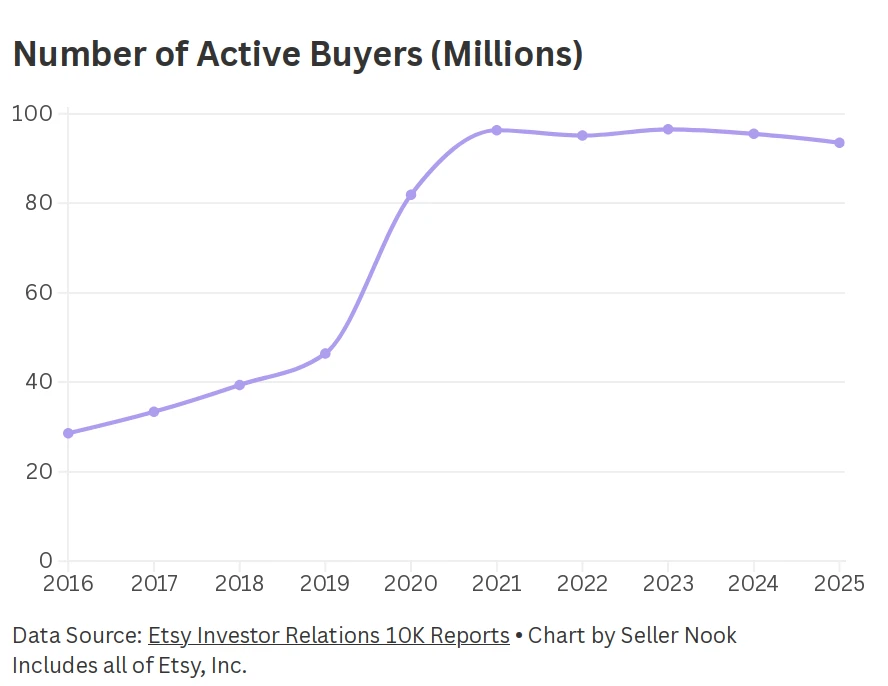
Graph of number of active buyers on Etsy

Number of active buyers on Etsy by year. 


According to Etsy’s financial reports, the number of active buyers on Etsy (who made at least one purchase in the past 12 months) has more than doubled since 2019, and sits at 93.5 million as of the end of 2025. While the large increase during the pandemic has plateaued, there has only been a slight decrease in recent years.

We can conclude that people certainly do still shop on Etsy.

Are people still spending their money on Etsy?

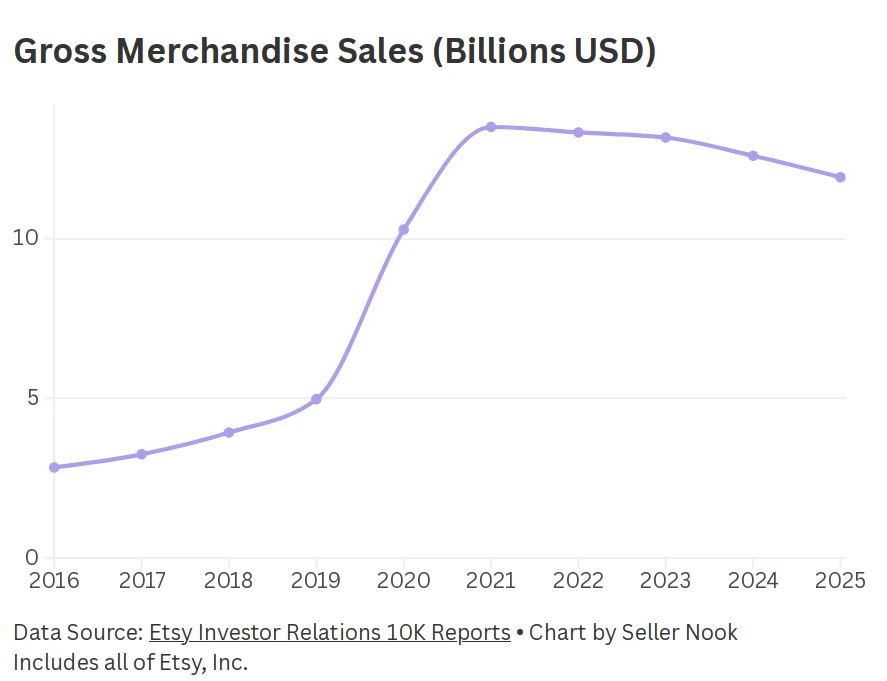
Graph of Gross Merchandise Sales (GMS) on Etsy by year

Etsy’s Gross Merchandise Sales (GMS) by year. 


The overall increasing trend in gross merchandise sales (GMS) is similar to active buyers, where there was a large rise (more than double) during the pandemic, followed by a gradual decline during the next few years. GMS is still much higher than before the pandemic though, at $11.9 billion in 2025.

People are very much still spending their money on Etsy.

Is there too much competition on Etsy?

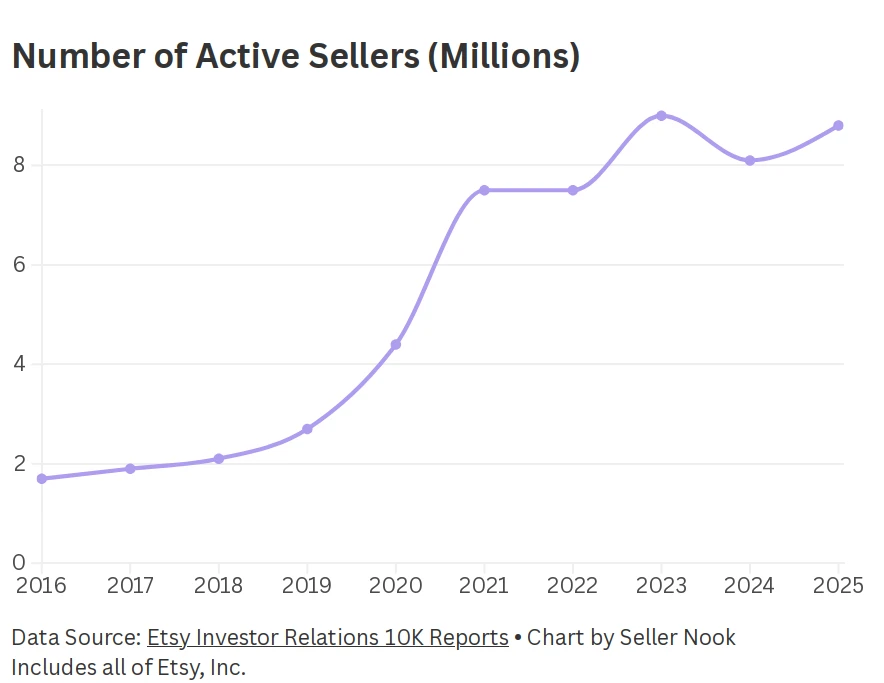
Etsy has 8.8 million active sellers as of the end of 2025. There was a drop in 2024 as Etsy attempted to clean up and remove shops that violated their policies. They also introduced a fee for new shops to reduce spam. The overall increase in sellers, with growth slowing after the pandemic, is all good news for legitimate sellers.

Graph of number of active sellers on Etsy by year

Number of active sellers on Etsy by year. 


Those of you with a mathematical eye might have noticed that there are on average 12 buyers for every seller, and this number has been decreasing. But don’t let that deter you. Most of the sales and revenue are being made by the top sellers, and you could become one of those sellers.

Despite there being many sellers on Etsy, take heart as the bar can be quite low.

Many are doing it as a hobby, and many will give up after they don’t see quick success. Etsy is for the long game. So if you are serious and committed to Etsy, your competition is not as steep as you might think.

I will come back to the idea of competition and saturation from a digital products perspective below.

Is Etsy in trouble? Will they go out of business?

You might be wondering about of the longevity of Etsy. Maybe you’ve heard talk that they are in trouble. With so many competing marketplaces, including low cost platforms like Temu and Shein, are Etsy in danger of going out of business?

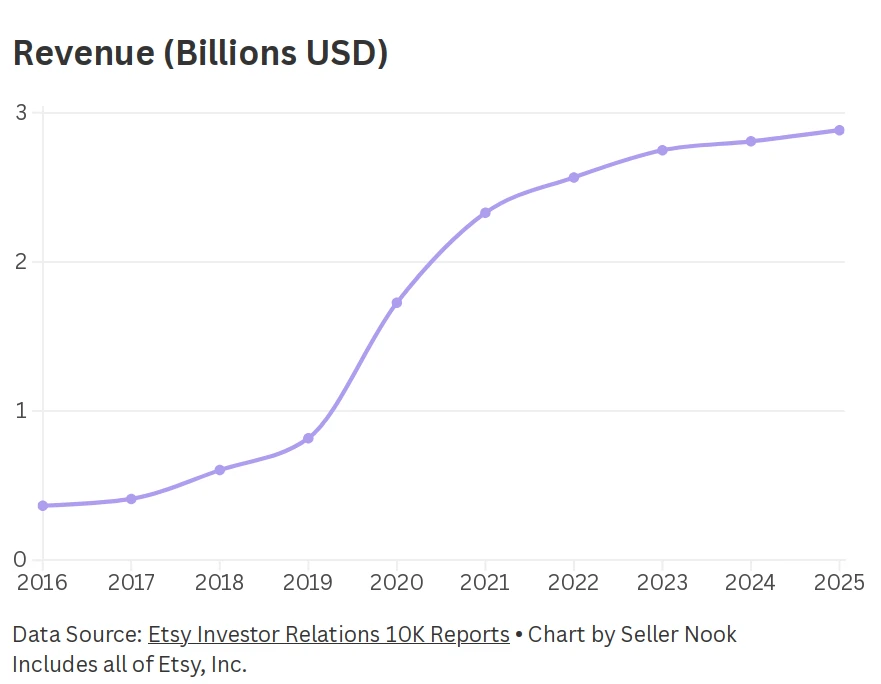
Etsy’s revenue has been steadily increasing over the past decade, with a jump during the pandemic. While revenue growth has since slowed, revenue has not shown the same decrease after the pandemic as the other metrics I’ve discussed.

We can conclude that Etsy seems to be doing just fine.

Graph of Etsy's revenue by year

Etsy’s revenue by year. 


The financial picture overall

Looking at long term trends over the past decade, Etsy has an overall increase in active buyers and sellers, gross merchandise sales (GMS) and revenue.

It is true that some of these figures have been decreasing over the past few years, but some regression to more typical levels is to be expected after the huge surge in online shopping during the pandemic.

Are there good alternatives to Etsy for selling digital products?

Etsy vs other marketplaces

The Etsy marketplace is particularly well suited to selling digital products as they have a special product type for digital downloads and they are highly sought after. You will find many digital download bestsellers and hugely successful shops which only sell digital downloads.

Most other large online marketplaces (such as eBay, Amazon, Walmart, Temu, Shein) are very restricted in the sale of digital downloads, so aren’t really an option you can consider.

Gumroad is a marketplace that specialises in digital downloads, but they are much smaller than Etsy so your products would be seen by a much smaller audience unless you drive traffic there yourself.

There is a discovery element to Gumroad, but it is limited. Most shops would not be relying on this (or else face a steep 30% fee, compared to the usual 10% + $0.50).

Etsy vs Shopify

Your own Shopify website can be a good option for selling digital downloads, but if you are just starting with selling digital products, I would definitely recommend Etsy instead.

This could be a whole blog article on its own, but the short version is:

When you build your own ecommerce website you are responsible for driving traffic to that website.

Sure, you should get some organic traffic from Google, but it probably won’t be at the levels you get on Etsy. If you are a marketing genius or social media guru, then driving your own traffic might not worry you. But otherwise, don’t underestimate how much work this will be, and how much of your focus it will take away from designing awesome products.

There is also a learning curve to building your own website, even using a platform like Shopify. If you have no interest in learning this, and are not in a position to hire a web developer, this is another reason Shopify might not be for you (yet).

Finally, Etsy also has fewer upfront fees, as I’ll discuss below.

Are Etsy’s fees too high?

Etsy fees

While Etsy has seller fees, they are similar to other platforms. I won’t compare with the platforms that don’t allow digital download sales, but compared to Gumroad, the fees work out slightly cheaper with Etsy (assuming a $5 sale price. For more expensive items, Etsy becomes even more attractive in terms of fees).

There are also fees for ads which can go as high as you choose, but they are optional (except for off-site ad fees). If the ads are running profitably, this should not be a concern. I see ads as an important part of selling on Etsy, and I’ll talk about this more in a future blog post as it’s a big topic!

For Etsy you have a listing fee ($0.20 USD) and a small fee when you sell a product (transaction and payment processing fees). There is no monthly fee.

Shopify fees

On the other hand, with Shopify, there is a monthy fee (starting at $29 USD), with the upside of lower fees per sale.

Shopify’s monthly fee might not sound like a lot, but when you’re just starting out and not making many sales yet, these upfront fees could make starting out feel more stressful than it needs to.

You also need to budget for any paid Shopify apps you use, and speaking from experience, you will need a few!

What do you get for your money with Etsy?

Not only do they take care of all payment processing for customers across the world, but Etsy exposes your products to a large audience of customers who are ready to buy.

To take my own business as an example of this readiness to buy, in the past month the conversion rate (percentage of people who viewed my product and then bought it) was more than 6 times higher on Etsy than on my Shopify website. This was not a fluke. My conversion rate on Etsy is always much higher than it is on my Shopify website.

Is Etsy too saturated for new sellers?

I touched on this earlier, but I want to reassure you.

There is room in the market for your shop, providing you choose your product and niche carefully.

For proof of this, if you have a paid eRank account, you can go through the list of Top Sellers which started in the past year or two. I guarantee you will find many that focus on digital downloads of some kind.

Update: I’m looking into compiling information about top recently opened digital shops for you, but in the meantime you can sign up for eRank* and see for yourself. I did this when I first started and it was useful to see successful new shops selling what I was interested in.

The other way to find these successful new shops is just to do a search on Etsy for the product you’re interested in selling.

Look for products labelled ‘Bestseller’ or ‘Popular now’, especially when those shops have a low number of reviews

These could very well be new shops. Go to their shop page to find out the shop’s age (scroll down past their reviews to find this).

Next steps

If you were hesitating about starting your own digital products shop, I hope this post has helped you to see the potential Etsy still has today.

If you would like a shortcut to getting your shop started, I have written a short guide book to take you through each of the steps in opening your first Etsy shop. It should take less than an hour to read, but is packed full of advice based on my own experience building a 6-figure shop with over 30k sales:

Make Money Selling Digital Products on Etsy eBook


* This post contains affiliate links. If you choose to sign up through my link I may earn a small commission at no extra cost to you.

I only have affiliate links for tools I have personally used and found helpful.
Image

If you are thinking about selling on Etsy but are not sure what to sell, the first advice I always give is to do research.

If you already have a shop and are not sure why you are not getting views or sales, my advice is also to do research.

But I realise that “do research” is quite a vague piece of advice and you might not know how to go about this.

In this post I will clearly explain the research process I would follow.

A bit about my background: Before I became a 6-figure Etsy seller, I was actually a researcher. So this is my bread and butter!

There are 2 types of research that are important at different stages:

  1. Market research — broad research into what types of products and niches are selling well on Etsy
  2. Product research — a deep dive into a particular product type

I’ll take you through each of these with examples and screenshots.

But first, if you want to find out the best products to sell on Etsy in 2026, I have spent days doing the research for you. You can pick up my guide on Gumroad: 6 Best Digital Products To Sell on Etsy in 2026

Market research

The first stage is market research, where you take a broad look at the types of products and niches that are selling well on Etsy, and their competition levels.

If I was at the stage of wanting to sell a new type of product on Etsy, I would do market research using these steps:

  1. Brainstorm ideas
  2. Look for evidence of demand
  3. Verify competition vs demand
  4. Generate more ideas
  5. Analyse ideas and find winners

Brainstorm ideas

First I would brainstorm ideas for products and niches based on what I’ve seen or heard of, and what I’m interested in. For example, a product could be “invitations” and a niche could be “wedding”.

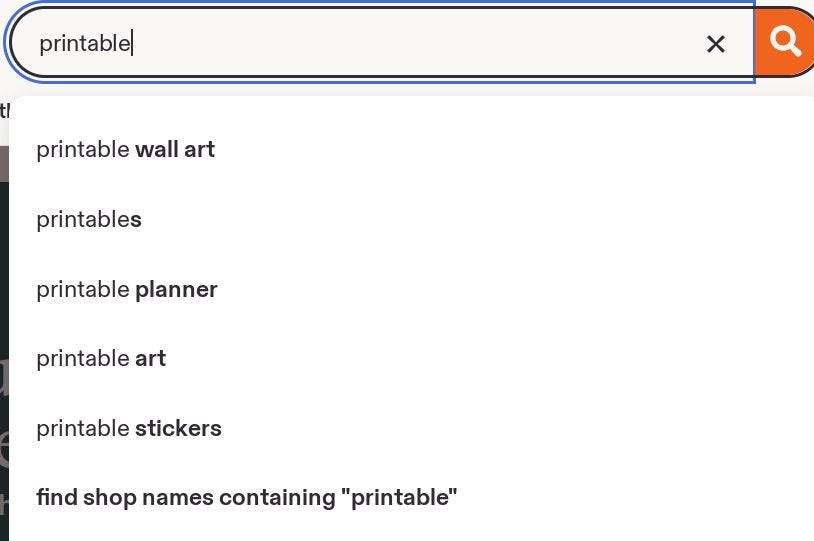
I would then take these ideas into Etsy search. Before doing the searches I would look at the auto-complete suggestions.

Then I would do the searches and look for other ideas in the search results.

If I really had no ideas to start with, I would just enter a very broad search term into Etsy like “digital download” or “printable” and see what came up.

I’d put all these ideas into a list.


Screenshot of Etsy search autocomplete suggestionsEtsy search auto-complete suggestions

Look for evidence of demand

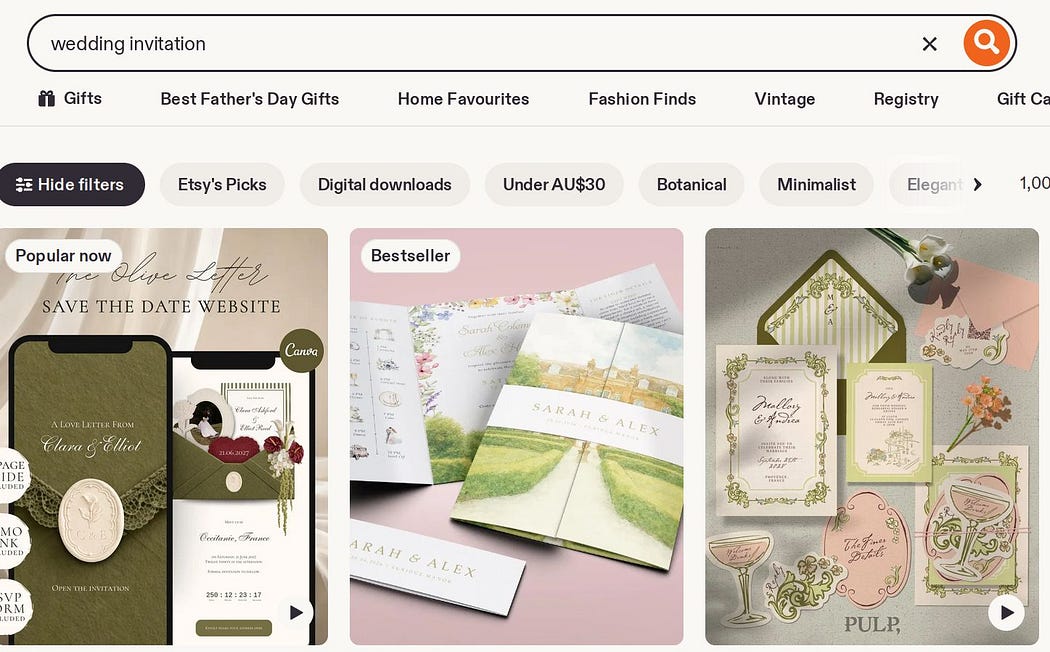
I would look through the Etsy search results for the ideas I brainstormed and look for “Bestseller” and “Popular now” badges. I would want to see several of these on the first page as a rough indicator of current demand.


Screenshot of Etsy search results showing listings with “Bestseller” and “Popular now” badges.Example of “Bestseller” and “Popular now” on Etsy search results


Verify competition and demand

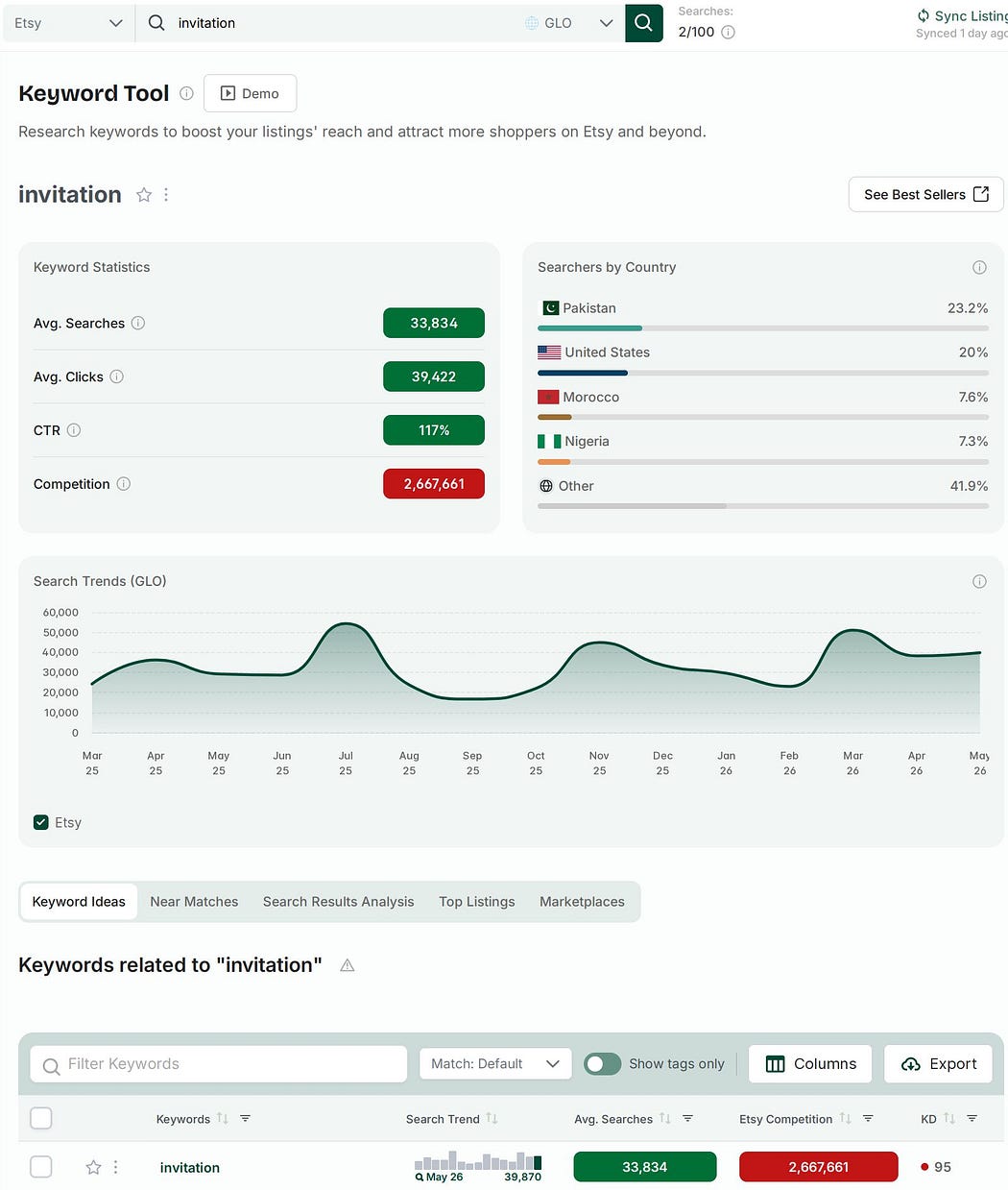
Using either Etsy Marketplace Insights or a 3rd party tool like eRank*, I would search for the keywords I identified earlier and note the competition (search volume) and demand (number of listings).

I prefer eRank over Etsy’s tool as it gives 12 month averages rather than Etsy’s past 30-day view. I also like that eRank gives a keyword difficulty score for each keyword and it has CSV export which saves a lot of time!

Note: I would do these searches one by one in eRank rather than in bulk, so that it generates more ideas for the next step.


Screenshot of results overview from eRank’s Keyword Tool for “invitation”Results overview from eRank’s Keyword Tool for “invitation”. Note the time period in the graph is more than 1 year.


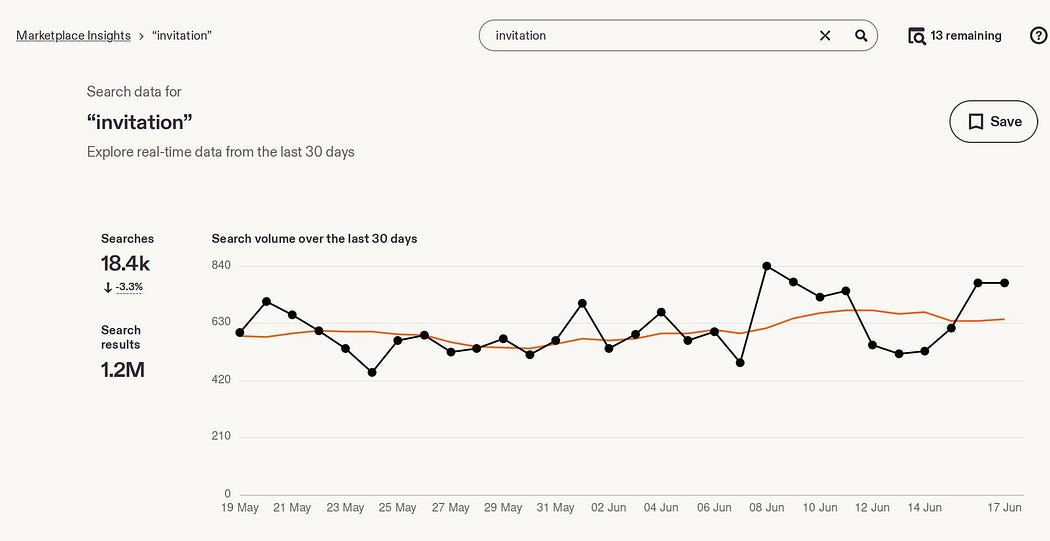
Screenshot of the Results overview from Etsy’s Marketplace Insights Tool for “invitation”Results overview from Etsy’s Marketplace Insights Tool for “invitation”. Note the time period in the graph is 30 days.


Why are the numbers different?

You might have noticed that the search and competition numbers are different in these 2 tools. The biggest reason is that Etsy’s data are for the past 30 days whereas eRank’s are averaged over the past 12 months.

Another reason for discrepancies is that eRank’s data are estimated whereas Etsy’s are the source of truth.

However, I wouldn’t get too hung up on the exact numbers here. It’s more important to notice the relative differences between keywords, and the ratio of searches to competition.

Generate more ideas

Both Etsy’s tool and eRank give related keyword suggestions. I would go through these and make a note of anything promising. I would only keep keywords with a monthly search volume of at least 500. I would transfer all the data into my own spreadsheet (I use Google Sheets).


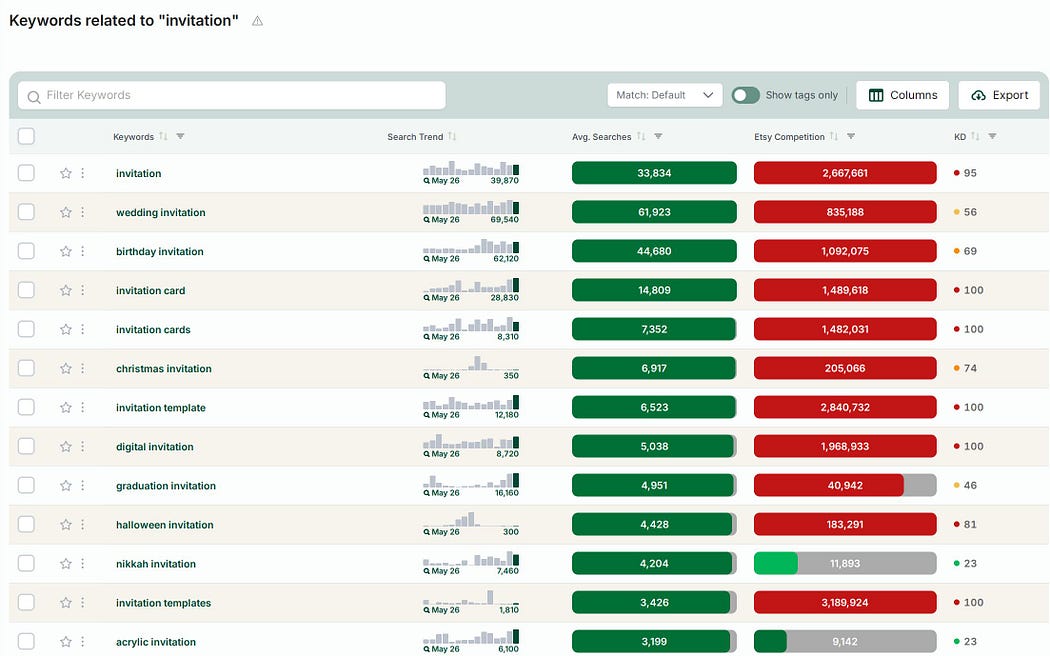
A screenshot of keyword suggestions from eRankKeyword suggestions from eRank. Note the KD (keyword difficulty) column and the Export button. Both very handy! Also note that these numbers are averages over the past 12 months.


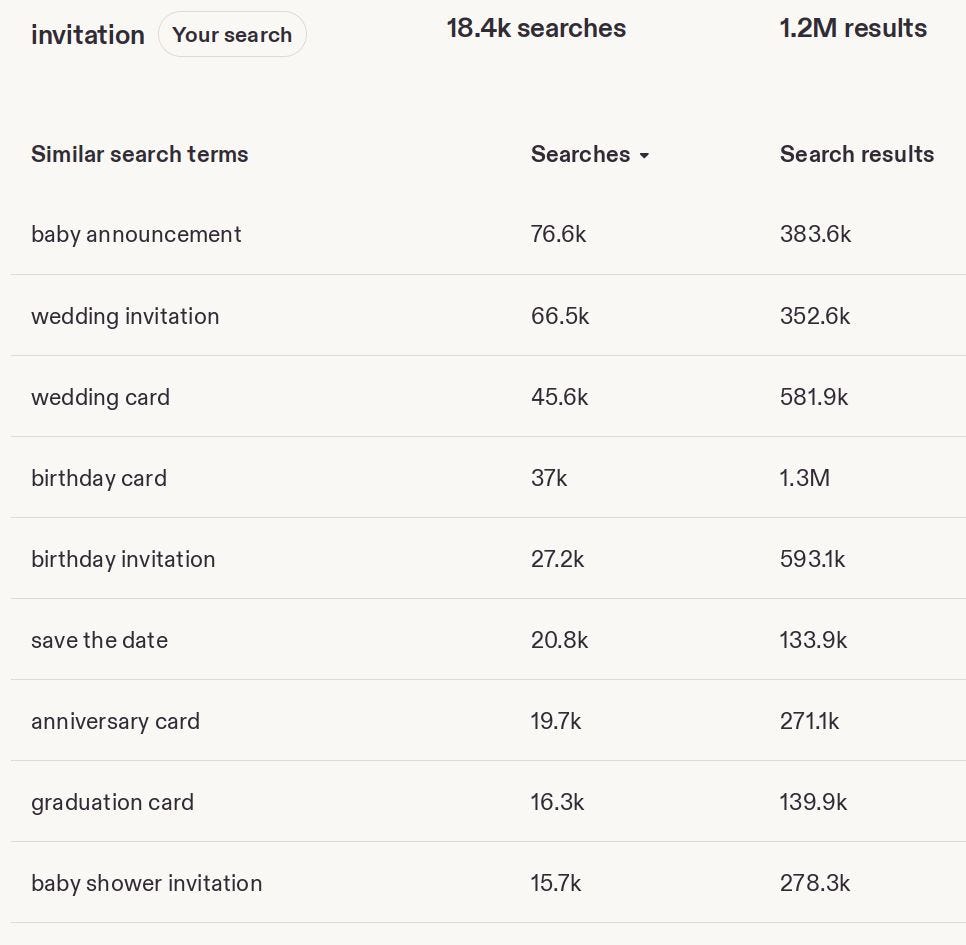
A screenshot of keyword suggestions from Etsy’s Marketplace Insights tool.Keyword suggestions from Etsy’s Marketplace Insights tool. Note that these numbers are for the past 30 days only.


Analyse ideas and find winners

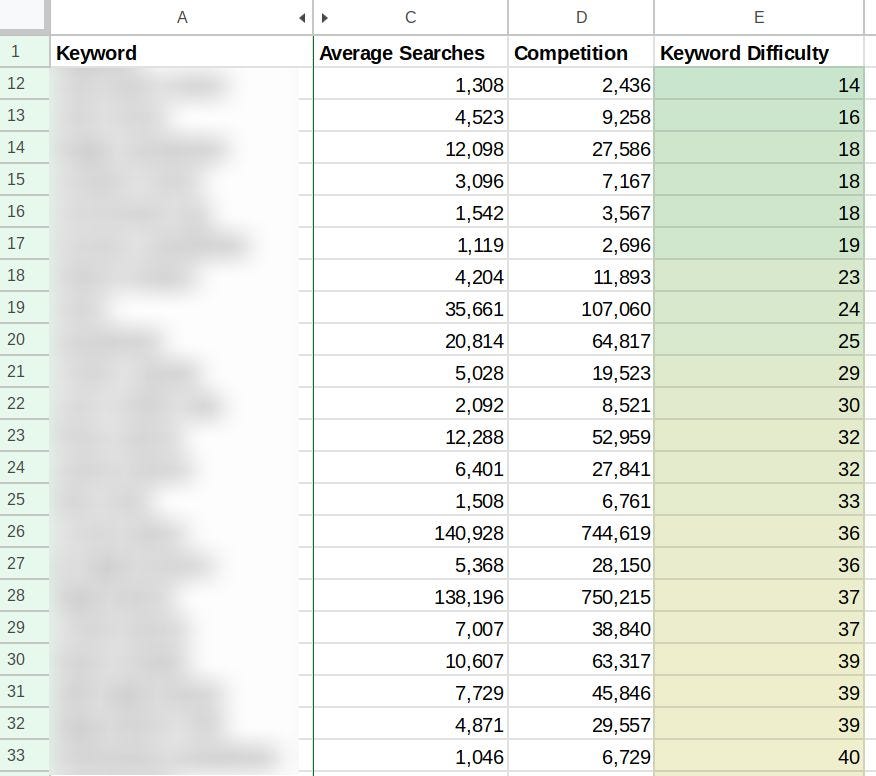
I would sort the list by keyword difficulty (or a ratio of searches to search volume, if I used Etsy’s tool), and I would add conditional formatting to colour code them (optional, but it’s fun and makes it much clearer!)


Screenshot of part of a spreadsheet with keywords, search volume, competition and keyword difficulty colour-coded.What your spreadsheet could look like after doing this market research, with keywords, search volume, competition and keyword difficulty colour-coded.


Those with the lowest keyword difficulty are my potential winners.

I would go through those and decide which ideas align with my own skills and passions. This is very important as I will need to make a lot of products to succeed.

We now have our product type and niche(s) selected, but we’re not finished with research yet! The next phase of research is just as important.

Product research

The next stage is product research, where you analyse competitors’ products to understand common patterns in what works well and find areas where there is room for improvement.

Now that I know what I will be selling, rather than immediately starting on my designs (a temptation!), it is best to understand what is already selling well on Etsy and where there are gaps in the market.

I would do this by finding “exemplars” — the best examples of successful products on Etsy.

How would I identify these? The first place is Etsy itself. Once again I would be looking for listings with “Bestseller” or “Popular now” badges.

I would go through each listing a make a note of things like:

Product:

  • Colour palette
  • Aesthetic style
  • Features
  • Number of pages or size
  • Reviews, both positive and negative

Listing:

  • Titles
  • Tags (see note below)
  • Descriptions
  • Thumbnails and other images
  • Pricing

I would use a Canva whiteboard to gather my observations using sticky notes, and I would also paste in screenshots as a visual aid.

The goal here is not to copy individual products or listings! It is to find overarching patterns in the products and listings. What makes these successful? And equally important, what are they missing that I could provide?

A note about 3rd party tools

The other way you can find these exemplars is using 3rd party tools. I’ve tried a few and I like Alura* and eRank* for this.

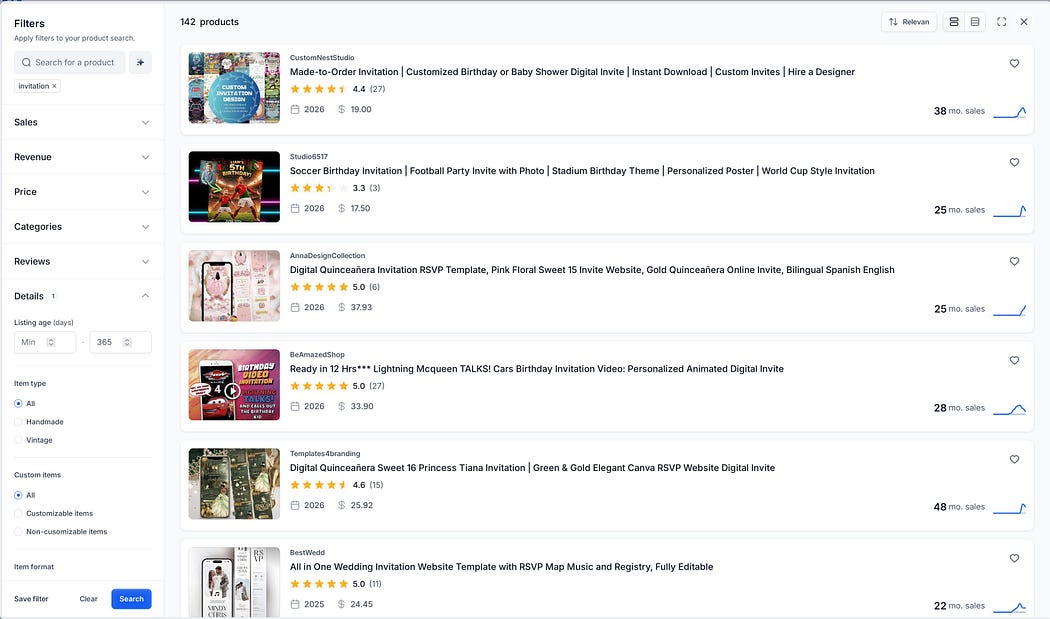
Alura’s Product Finder is nice to use because of the large product images and comprehensive filters, but you would need a mid-tier plan to access their full database of products.


Alura’s Product Finder. Results for “invitation”.

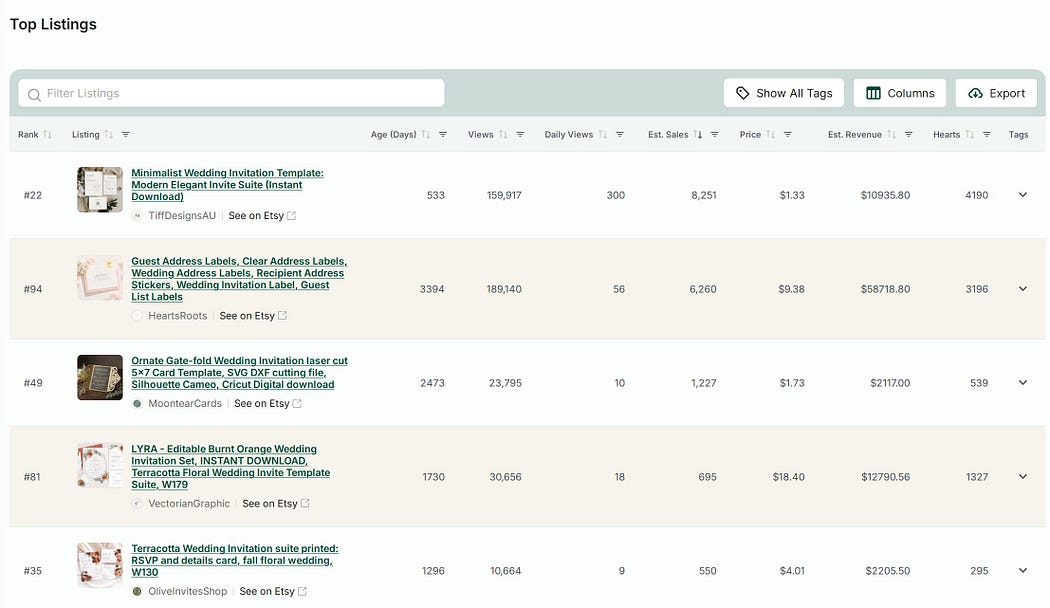
eRank’s Top Listings is part of their Keyword tool results. It only covers the top 100 listings but it is great value. In fact I believe you get a few free uses of this per day.


eRank’s Top Listings. Results for “wedding invitation”.


The advantage of using these tools is that you can get a better idea of volume of sales, and can filter to newer products. But the disadvantage is that these catalogues don’t cover every product released and can be out-of-date. This can be a problem when your product is highly seasonal.

You should also be aware that most of the numbers in these tools are estimates only, as Etsy does not share sales data on a product level.

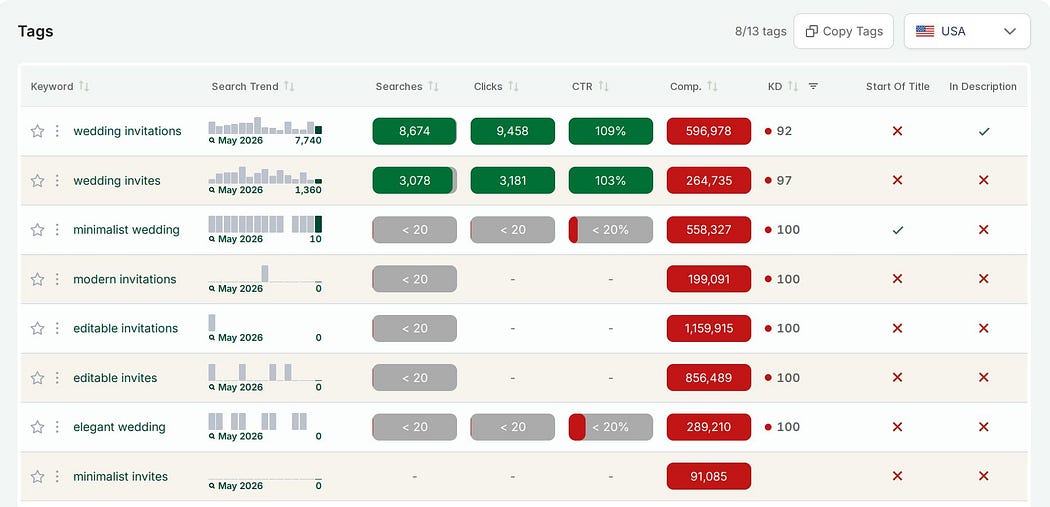
One area where 3rd party tools shine is their ability to display the tags for competitors’ listings. My preferred tool for this is eRank*. What I also found useful in the beginning was to look at the entire set of tags used by a competitor shop and sort them by keyword difficulty. I found a few low competition gems this way in my shop’s early days.


Screenshot of eRank’s view of a listing’s tags.eRank can show tags for a particular listing, as shown here, or for a full shop.


So, in summary:

How to do research for Etsy

First, do broad market research to find out which products and niches sell best on Etsy, and have reasonable levels of competition. Brainstorm a list of keywords and then check it against Etsy and other keyword research tools. Prioritise this list based on keyword difficulty and find the overlap with your own skills and passions.

Next, deep dive into product research to understand what is working well for your competitors and where there is room for improvement. Again, this research can be done directly on Etsy, though other tools can be useful for analysing tags. Use a digital whiteboard to gather notes and screenshots about both products and listings, to make it easier to find common patterns.

This post may have made you feel excited to go off and do your own market and product research.

Or it might have made you feel like you wish someone else would do it for you! If so, I have good news. I spent days researching the top products and niches to sell on Etsy, based on demand and competition levels over the past 12 months, as well as the top shops from 2025. You can get this guide here: 6 Best Digital Products To Sell on Etsy in 2026


* This post contains affiliate links. If you choose to sign up through my link I may earn a small commission at no extra cost to you.

I only have affiliate links for tools I have personally used and found helpful.
Image

The first sale is thrilling.

I still remember waking up to an alert on my phone and feeling like it couldn’t be real.

While I was sleeping, someone had wanted to pay me $1.80 in exchange for my digital product.

The next sale did not come quickly. It was 19 long days later.

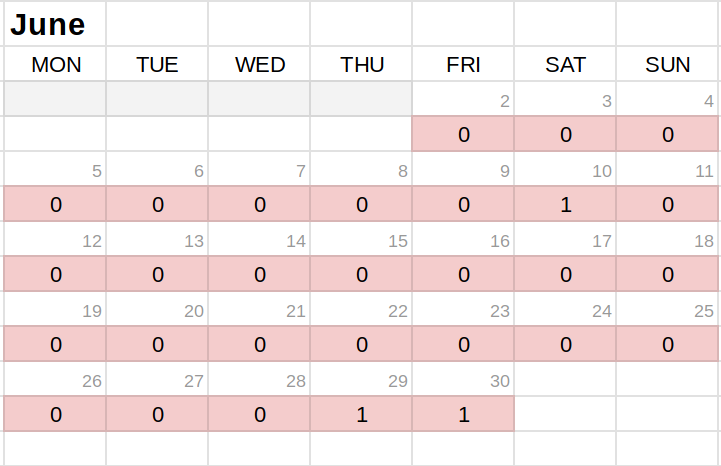
My first month selling on Etsy was less than impressive:


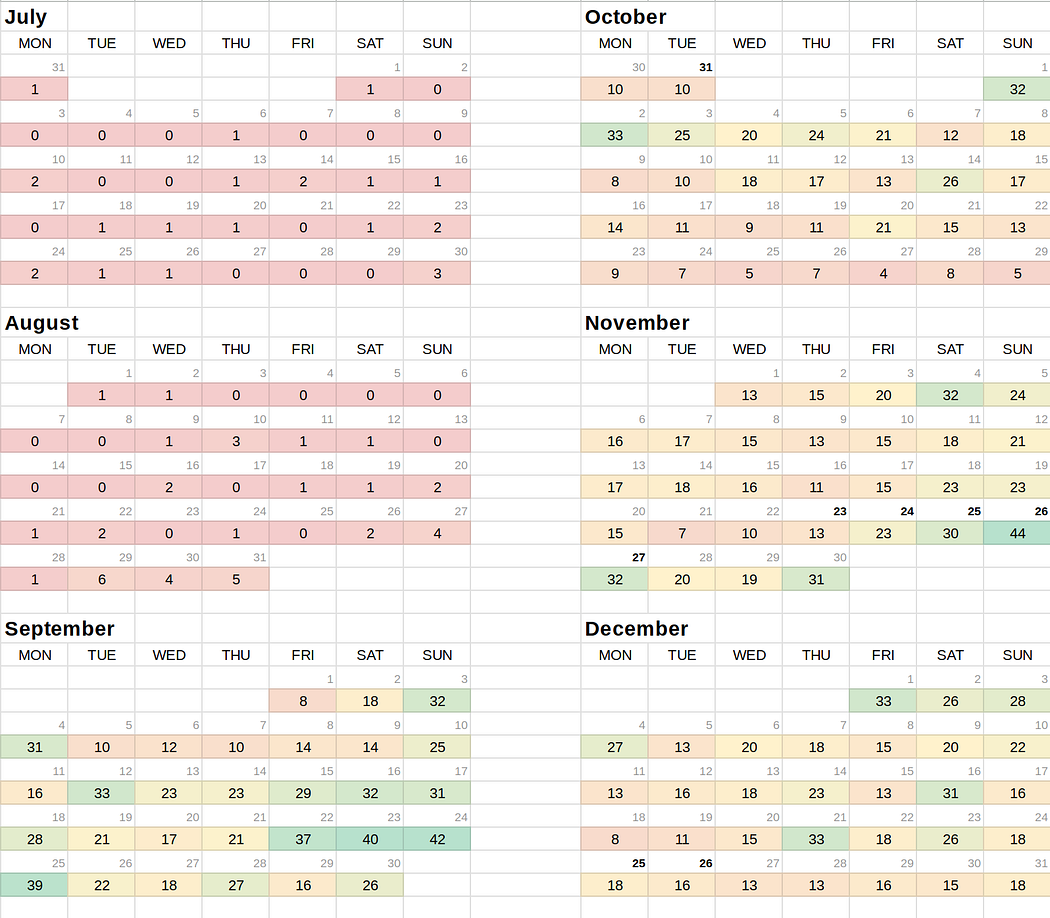
Calendar showing number of orders per day in my first month on Etsy.My first month on Etsy was June 2023. I had 3 orders and made $6.60 in revenue.


Sales were sporadic until late August when one of my seasonal items took off.

This product became a best seller, and the increased attention led to more sales of my others items, and more best sellers.

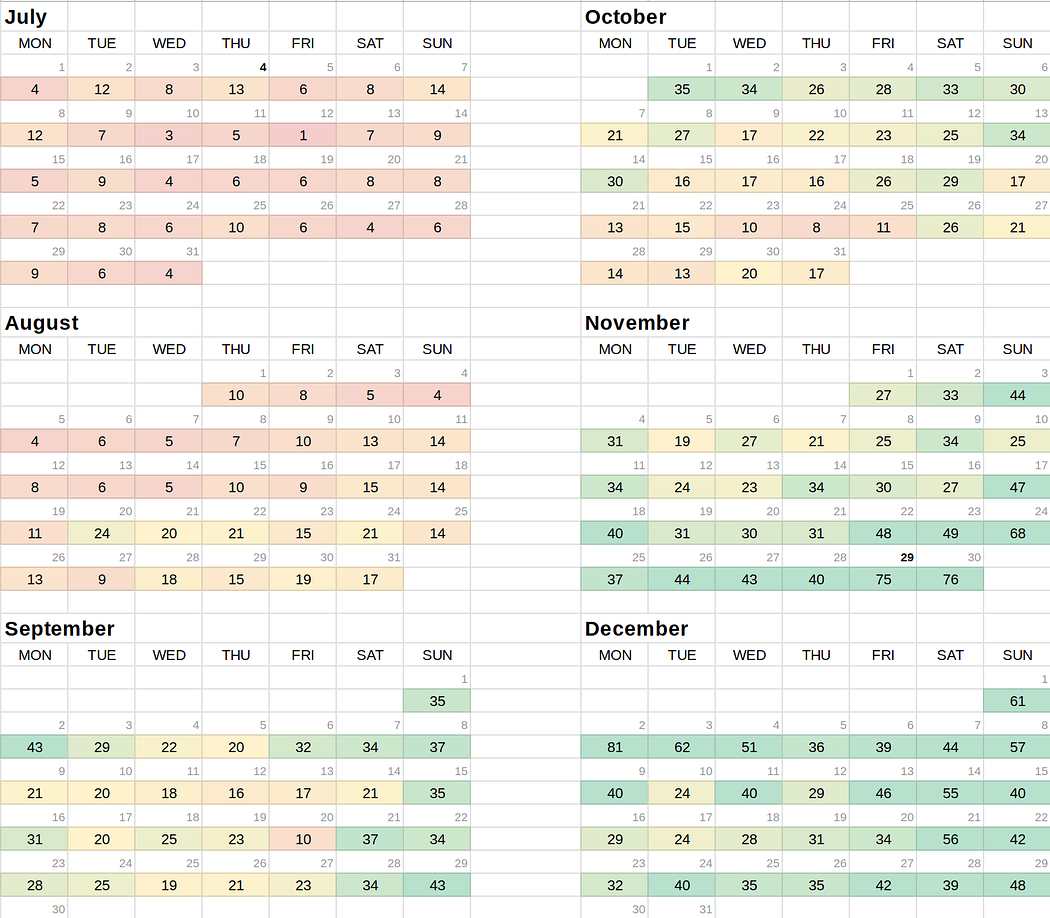
Sales went up and down over the next 6 months, but always stayed above 0, so they were consistent in that respect, but certainly not consistent in number! My highest sales were over the Black Friday weekend at the end of November, with the peak day bringing in 44 orders.


Calendar of my daily orders for the next 6 monthsMy shop’s number of daily orders over the next 6 months. There were ups and downs, with peaks in September (Halloween) and Black Friday weekend (Christmas).


One year later, now with hundreds more listings in my shop, daily sales were still consistently above 0, but still varying wildly from month to month, with a slow Summer. Overall my sales were higher than my first year, with my best day (Black Friday weekend again) bringing me 81 orders!


Calendar of my daily orders 1 year laterMy shop’s daily orders one year later, peaking at 81 in early December.


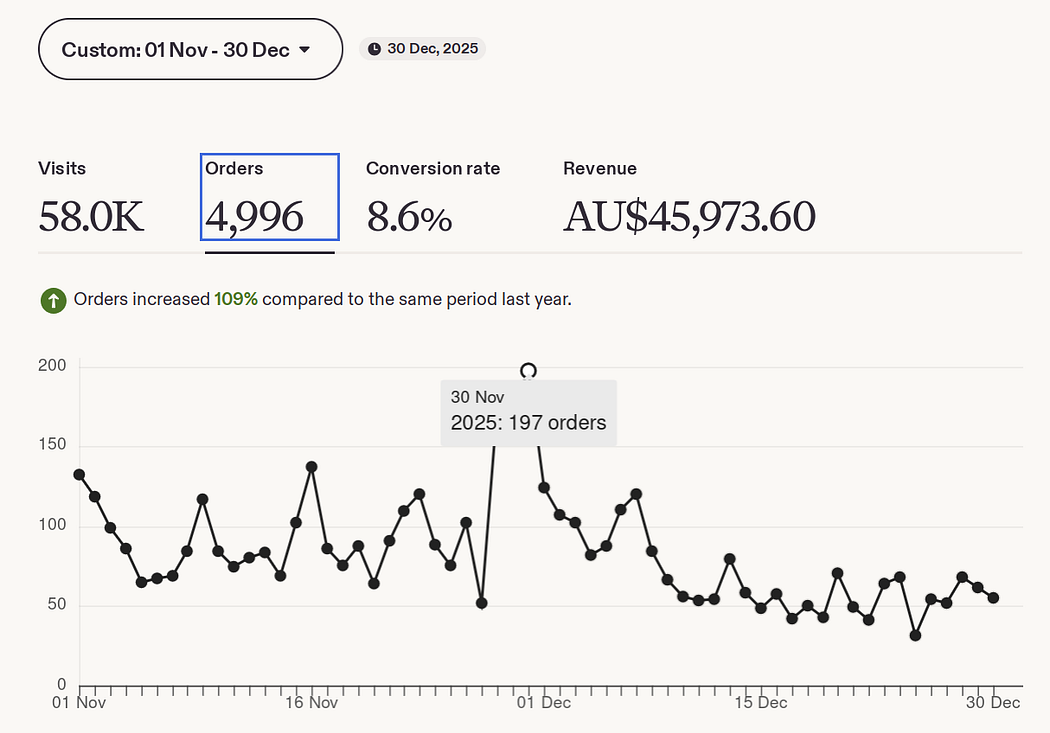
The following year, Black Friday weekend brought me 546 orders over 3 days, with the peak day bringing 197 orders. I wasn’t expecting this! But that’s the beauty of digital products. I didn’t have to do anything to fulfil those orders.

I don’t have a pretty calendar to show you for 2025 as I stopped making them about a year ago because of all the manual data entry, but I do like seeing my sales this way! It show the extreme seasonality of the type of products I sell as well as the large day-to-day swings.

But here is the graph directly from Etsy.


My shop’s number of daily orders from November to December 2025.


Why am I telling you all this?

I wrote this post because this question gets asked a lot in my Etsy Digital Seller community.

“How long does it take to get consistent sales?”


Of course it’s different for every shop, but for mine it was about 3 months.

I believe this was for a few reasons, in order of importance:

  1. Seasonality: Q4 (Quarter 4, October to December) is always my shop’s busiest period. My products for Halloween and Christmas sell well. So in opening my shop in June, the quiet Summer season, I was really setting myself up for a challenge!
  2. Understanding customers: I would have had over 100 listings when my shop took off. In making all of those products and listings, I was improving my skills and learning what customers wanted through research. My first best seller was a combination of a couple of themes that were already popular on Etsy, presented in a way that no one else had done at that time.
  3. Etsy ads: Looking back on my records, I did start advertising rather early, a few weeks after opening my shop, when I only had one sale. That was a bit risky, but I do think it helped raise my visibility. I think advertising in June was probably too early, but certainly advertising from September would have been a good idea as I sell in a competitive niche.

So if you are in your first few months and your sales are sporadic, don’t lose hope!

All it takes is one popular product or the right seasonal event to come along, and things can change very quickly. Three months from opening my shop I went from 1 daily order to 32 daily orders in less than a week!

Other than keeping going and creating more listings, I would say to make sure you’re creating products that customers are looking for. If you’re not sure how to do that, check out my post on how to do product research on Etsy.

If you’re interested in the best way to run Etsy ads in the early days, take a look at my post on Etsy ads for new shops.

Or for a complete guide to selling digital products on Etsy, I have a short but value-packed ebook that should help make everything clear so you can get started with confidence.

Image

Based on my experience of making $197,847 in 3 years


Making money online is an enticing proposition.

While in the past people might have started an Etsy shop because they were skilled in a particular craft or had access to vintage goods, I’m now seeing more and more people who want to open shops without necessarily knowing what they want to sell.

They are keen to explore selling digital products on Etsy, but without much of a clue where to even start.

So I wrote an ebook to take budding entrepreneurs through the steps one by one to make the whole process less intimidating and overwhelming.

I get so frustrated with all the nay-sayers on Reddit. I’ve had a decent amount of success with Etsy in the past 3 years (revenue screenshots are here) and while, yes, it’s competitive, I still fully believe it’s possible to be successful on there as a new shop.

So with that in mind, when starting a shop from scratch, these are the steps I recommend following:

  1. Pick your product and niche
  2. Research your competitors
  3. Design your products
  4. Price your products
  5. Prepare your shop
  6. List your products
  7. Promote your shop (with Etsy Ads) — optional

You can get my free New Etsy Shop Checklist with these steps and subtasks on Gumroad, so you can print the list and have the satisfaction of checking them off as you go :)

Let’s quickly go through each of these, but for more specific advice you can pick up my Make Money Selling Digital Products on Etsy ebook which is currently 50% off because I just launched it — yay! 🎉

1. Pick your product and niche

This is incredibly important. I can’t say that enough. People who dive in head first without doing any research are likely to be disappointed.

I won’t go into market research techniques here, but basically you are looking for products that are in demand and have reasonable competition levels. You can do this using Etsy’s Markplace Insights tool or a 3rd party tool like eRank*.

You are also looking for products that align with your skills and passions, as it’s very likely you’ll need to make a lot of products to succeed in selling digital products.

Narrowing down your focus to niches and subniches helps you break through the competition and establish yourself as an expert in that space.

2. Research your competitors

So you do market research to help you choose a product and niche. But after that, you should do more research, this time focusing more closely on products.

A digital whiteboard is a good way to do this. You gather examples from your competitors and find common patterns. You look at what they are doing well and where there is room for improvement. This includes examining their images, titles, descriptions and customer reviews.

3. Design your products

After doing competitor research you should have a good idea of how you can add value to the market with your products.

While I can’t go through each product and how to design it here, I can help you pick out good tools to help make the process easier. The most popular tools would probably be Canva and Photoshop/Photopea. There are others that are more appropriate for specific types of products, but Canva and Photoshop are solid choices not only for creating your products but also for creating your (very important) listing photos.

4. Price your products

It’s a common dilemma for new shops. Do you price on the higher side or lower side? There are pros and cons of each, but it can be easier to get your first reviews and sales if your prices are on the lower side at the beginning.

5. Prepare your shop

Filling out all parts of your shop is important for building trust with customers and the Etsy algorithm. This includes sections like Policies and your About section.

6. List your products

This is more work than most people realise. Most important is the thumbnail and ensuring it’s designed in a way that attract clicks. Also important are the title and tags, which help people to find your products through keywords.

7. Promote your shop (with Etsy Ads)

New shops can grow faster using Etsy Ads, but it does have to be at the right time and in the right way. A little patience is needed as I generally don’t recommend ads before your first sale or review.

I know a lot of people use social media, but I have done very little of that so it is not included in my ebook. I guess this should come as a relief for anyone who had been dreading trying to build an audience on social media! It is definitely possible to be successful without it.

Well, that was just a brief summary of steps for new sellers, but if you want to learn more, you can get my brand new Make Money Selling Digital Products on Etsy ebook on Gumroad. It should be an easy read but it’s packed full of advice based on my experience as a 6-figure seller.


* This post contains affiliate links. If you choose to sign up through my link I may earn a small commission at no extra cost to you.

I only have affiliate links for tools I have personally used and found helpful.
Image

You’ve just opened your new shop and are full of excitement. You’re obsessing over your stats. No sales yet… and not very many views either. I wonder if I should turn on Etsy ads, you think.

Are Etsy ads worth it for new shops though? In a word, yes. Etsy ads can help your new shop gain traction faster if you do them the right way. You need to carefully consider your budget, which products to advertise, when to advertise and when to turn them off. Otherwise you risk losing an uncomfortable amount of money.

As someone who has spent over $20k on Etsy ads in the past 2 years, I credit ads with helping me to start and scale my successful 6-figure business. I’ll guide you through all these considerations so you’re in the best possible position to get sales and traction from your ads as soon as possible.


Etsy ads spend graphI have spent over $20k on Etsy ads in the past 2 years! 


Is it too early to start advertising?

Should you turn on your Etsy ads on Day 1?

There are 3 reasons I would wait to turn on ads:

  1. You don’t yet know which products will resonate the most with customers.
  2. You haven’t had time to fine-tune your offering and improve your skills.
  3. Without a sales history, you have no social proof. Potential customers will find it hard to trust you and make the purchase.

As tempting as it might be to turn on ads as soon as you launch your shop, I would recommend instead waiting until you have a few sales under your belt. Otherwise you could waste a lot of money. For me, this was a few weeks, but it can of course vary a lot.

Don’t expect your ads to be profitable right away. At the beginning, the goal is to improve your visibility and build up a history of sales and positive reviews. In time this will result in a higher conversion rate from clicks on your ads, and eventually profit.

What ad budget should you set?

Set your daily ad budget according to your risk tolerance and timeframes.

There is nothing wrong with starting with a budget of $1 or $2 per day, and slowly increasing it. This is what I did in my own shop. Initially my budget was $1 per day, but now (3 years later) my ad budget is around $100 per day during peak periods.

I don’t recommend increasing your budget too rapidly, as this can cause more unpredictable behaviour with the ads algorithm as it readjusts. For example, $1 to $2 to $5 to $10 is fine, but $1 to $50 to $200 could cause trouble.

What is your timeframe?

One way to calculate a good ad budget is to observe the average cost per click (CPC) after you’ve turned on ads. You can then calculate how many clicks you will get per day from your budget. Combine this with your conversion rate (number of clicks per sale) and you can calculate how much it will cost you in ad spend to make a single sale.

For example, say your clicks cost an average of $0.50, your daily ad budget is $1 and your conversion rate is 2%. Then 2 in 100 clicks will result in a sale, or 1 in 50, at a cost of 50 x $0.50 = $25. With an ad budget of $1 per day, this will take 25 days. If this is too slow for you, increase your budget.

These numbers don’t look good!

Obviously these numbers don’t look great, but with digital products there are definitely higher conversion rates possible, above the average for ecommerce (mine have been as high as 10%-15% during peak periods). Customers come to Etsy ready to shop, so this is a warm customer base.

The cost of ad clicks can also vary depending on many factors including your product’s sale price and the competition in the niche. A lower cost per click will make it easier to get value from increasing your ad budget.

As mentioned above, the goal initially is not to make a profit, but just to get a few sales and positive reviews so that future customers will be more likely to buy from you. The extra data Etsy gathers from running ads will also help the algorithm to better understand which customers to show your products to in both paid and organic search results.

What is your risk tolerance?

While it all seems rather mathematical so far, running ads does also have an emotional component which should not be underestimated. What is your risk tolerance? How upset will you be to see your ads spend $5 per day without a sale? Running ads does require a level of consistency and patience. It is not a good idea to play with the campaign too often.

Do you have to turn on ads at all?

No, you can run your shop without ads and may still find success. However, be aware that you are choosing not to use a powerful tool which can help to grow your business much faster.

What products should you advertise?

A question many people ask is whether they should advertise all of their listings or just a few. The answer does depend on your situation, which is why you might hear opposing advice out there.

Scenario A: You have set a low ad budget and have a low risk tolerance.
Only advertise a small number of your most popular listings, preferably based on past sales.

Scenario B: You have set a higher ad budget and have a high risk tolerance.
Advertise a larger number of your listings to see where customer preferences lie. Then fine-tune this list as performance data comes in.

With my established shop, I fall somewhere in between these two. I don’t advertise every product (I have over 1000!). I wait until a product is showing positive signs with at least 2 recent sales before turning on ads.

When should you turn ads off?

Etsy ads are not a set-and-forget thing. You should monitor your ads regularly and turn off under-performing ads. Otherwise you could find your budget being wasted on the wrong products. Not all products are well-suited to advertising, even if they do sell organically.

How do you determine if an ad is under-performing?

ROAS

The easiest way to check if your ads are under-performing for a particular product is to check its return on ad spend (ROAS). This is listed right in your Etsy Ads dashboard, and is the ratio of revenue to ad spend.

Formula for ROAS

ROAS = Revenue / Ad Spend

 Etsy Ads Dashboard showing ROAS — return on ad spendEtsy Ads dashboard showing ROAS — Return On Ad Spend. 


You might think that anything over 1 is a positive return on your investment, but you do need to take into account fees (listing fees, transaction fees and payment processing fees). As a digital seller, you don’t need to worry about other product costs or shipping. Then you can calculate your break-even ROAS and compare it to the one in the dashboard.

Formula for break-even ROAS

Break-even ROAS = 1 / Profit margin

For example, say my product price is $5 and my fees and costs are $1 (not the real number for Etsy, by the way. I have a free profit calculator on Gumroad that you can use to calculate actual fees and profits). Then I make $4 profit from each sale. My profit margin is then $4/$5 = 0.8 (that is, 80%). So my break even ROAS is 1/0.8 = 1.25.

If after a suitable amount of time, the ROAS for the product is less than your break-even ROAS, you would turn that ad off.

TACoS

Now it just sounds like I’m making up acronyms! But TACoS stands for Total Advertising Cost of Sale.

This is a measure of the success of your ads that looks at the bigger picture of how sustainable your advertising is.

It considers all the revenue that is related to the ad, not just ad clicks that resulted in a sale, but also the sales of your organic listing. It answers the question of whether advertising that listing is helping your overall store to be profitable.

You set a target TACoS based on what percentage of revenue you would like to be spent on advertising. Then if an ad rises above that target, you turn it off.

It is not so simple to calculate TACoS. The only tool I’m aware of that does it is ProfitTree. Note that its ads dashboard assumes USD shop currency (there are workarounds though).

ROAS is a good start, but TACoS is more holistic and a better measure in the long run.

How long should you let an ad run before assessing it?

How long to let an ad run before deciding if it should be turned off is one of the trickiest part of all of this, in my opinion.

There is no exact formula for when to assess your ad performance. A good rule of thumb I follow is to allow the ad spend to reach the product price.

So, for a $5 product, I would turn the ad off if the TACoS (and/or ROAS) didn’t meet my targets after spending $5 on ads.

This is better than deciding after an arbitrary time period, because you need to let the ad algorithm run for long enough to collect a representative sample of data. If you base this on ad spend, you are basing it on number of clicks, whereas if you base this only on number of days, you don’t know how much data has been collected in that time.

Exceptions can of course be made. Many digital products have seasonality, and you might use this knowledge to turn ads off sooner. For example, after Christmas you might be wise to turn off your Christmas ads, even if the historical data was good.

Final thoughts

Etsy ads are worth it for new shops, but there are a number of important considerations. As a new shop, you should not expect your ads to be immediately profitable. Increased visibility, sales and reviews are the goals, even at the expense of profit.

One caveat around very low cost digital products. Below a certain price, it will be unlikely you will ever make a profit from ads unless your conversion rate is very high, simply due to the cost per click. This doesn’t mean that you can’t still use ads as a way to help your shop gain early traction, but it does mean that you might have difficulty running profitable ads. In that case you should consider increasing your prices, creating bundles or bulk discounts to get your average order value up. But this is a topic for another article!

This is a large and complex topic and I could not cover every situation here. So please join my free Etsy Digital Seller community and ask me anything!

Image

Etsy ads can be a great way to boost your shop, but they are also a source of huge frustration and anxiety for many sellers. Many people question whether it is worth using Etsy ads at all, particularly when their shop has only opened recently.

There are 4 mistakes that I think are leading many new starters to a bad experience with Etsy ads.

1. No proof of concept

Turning ads on all your listings when you have no idea if your products are desirable or competitive, or if your listings are any good (for example, with titles, tags, images) is very risky and likely to lose you money. Some shops can do this because they are established and have a very good idea of what their customers want and they know their place in the market, but if you are a new shop, you probably don’t have that.

What to do? Turn ads on for your best sellers only at first, or those with the most favourites if you have no sales (but I suggest you wait till you do have some sales).

2. Unrealistic expectations

If you are a new shop and expecting Etsy ads to bring you traffic and sales in quick succession, this is not realistic. Ads will put your product in front of more people, but there are no guarantees they will buy it.

There are many reasons people won’t buy from you, particularly in the beginning. At that stage your stop has little to no social proof in the form of sales or reviews. Trusting in your shop will be a hurdle for most people, so your conversion rates will be lower even if your products are good. What this means is it will be harder for your ads to run profitably.

What to do? Be patient and treat ads as a way to get more visibility and data initially, rather than expecting a lot of sales and profitability from ads.

3. Not knowing your numbers

Beyond your initial push for visibility and data, in the longer term you want your ads to be profitable and sustainable. You need to know your break-even return on ad spend (ROAS) after accounting for fees. There are cases where it will never be profitable to run ads on a product, particularly for very low cost items where competition is high and clicks are expensive.

What to do? Calculate your break-even ROAS for your products. Use this and your conversion rate to decide if it makes sense to run ads. I have a free Etsy Fee Calculator that calculates break-even ROAS for you (for digital products only).

4. Setting and forgetting

Etsy ads do require supervision. How often is up to you, but I’d suggest keeping an eye on them daily or weekly. This isn’t to say you should be turning ads on and off willy nilly and constantly changing your budget (don’t do that! Resist the urge!), but you do need to be aware if a listing is quickly amassing too many clicks which aren’t converting.

What to do? Check your ads regularly to make sure nothing has gone haywire. Check the keywords Etsy is using and disable irrelevant keywords if they are using up clicks. Wait a suitable amount of time before judging if you should turn an ad off by comparing the listing’s ROAS with your break-even ROAS. Continue to feed the algorithm new products to advertise when you have a proof of concept for them (say, a few sales).

Final thoughts

Etsy ads can help your shop to grow faster but there are many ways they can go wrong. I hope this article has helped you become aware of some of these traps.

I have a detailed guide on Etsy ads and how to run them which includes how to calculate your break-even ROAS and how long to let ads run before assessing their performance.

For a shortcut to working out your numbers, you can also get my free Etsy Fee Calculator for digital sellers on Gumroad.

Image

I have a special freebie for you today! I’ve created a free Etsy fees and profit calculator spreadsheet that you can download below.

When starting your Etsy shop, you’ll need to figure out your pricing and profit margins. This is not straightforward as there are many different Etsy fees you need to take into account. But never fear, my spreadsheet makes this all easy.

Download your free Etsy Fee Calculator spreadsheet

This is on Gumroad, but you don’t need an account to download it. The file is in Excel (XLSX) format, but you can also import it into Google Sheets or LibreOffice Calc and it will work there too.

Before I give you a quick run-through of how the spreadsheet works, I want to give an overview of what it includes.

To work out your profit, as a digital seller you only need to calculate your Etsy fees as you have no other cost of goods or shipping costs. Of course you may have marketing/ad fees on top as well.

What Etsy fees are there?

There are 5 types of Etsy fees, and here are their current values, as of 25 January 2026. Except for the listing fee which is charged at the point of listing the product, all other fees are charged only after making a sale. Links below are to the official Etsy documentation:

Listing Fee: $0.20 USD

Transaction Fee: 6.5% of product price

Payment Processing Fee: Varies by country and for domestic/international sales. For the US, it is $0.25 USD + 3% of product price

Regulatory Operating Fee: In certain countries

VAT on seller fees: In certain countries, in certain circumstances

How to use the spreadsheet

Step 1: Download the spreadsheet

Download your free Etsy Fee Calculator spreadsheet


Step 2: Fill out the fees and rate information


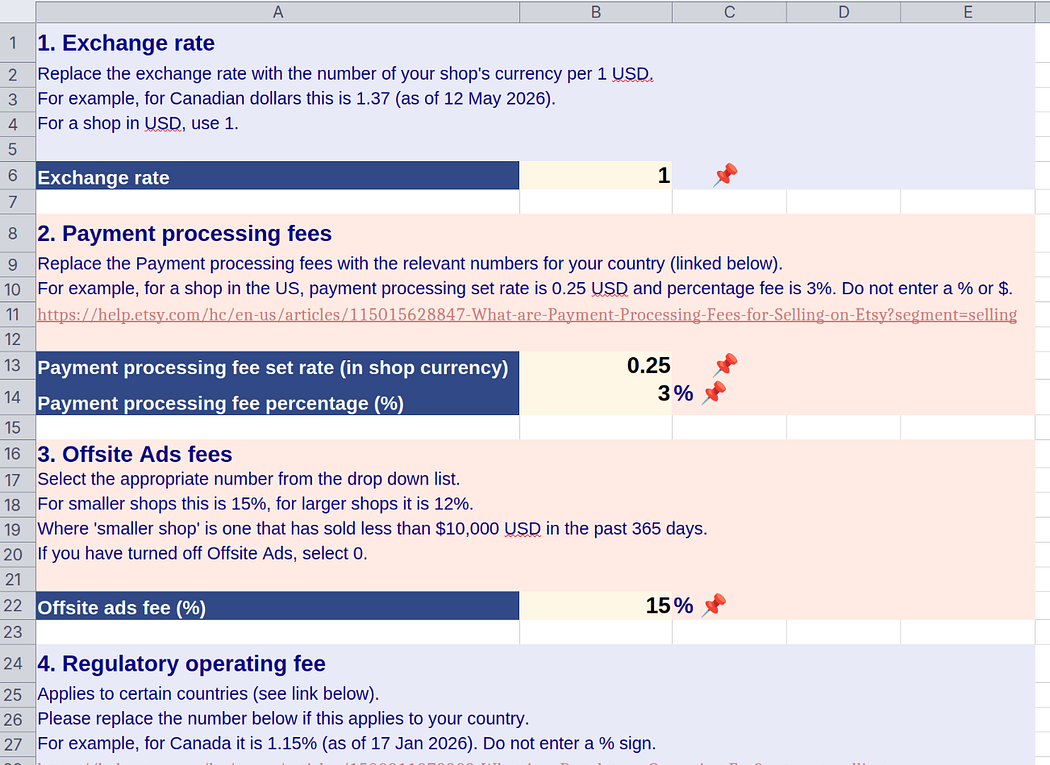
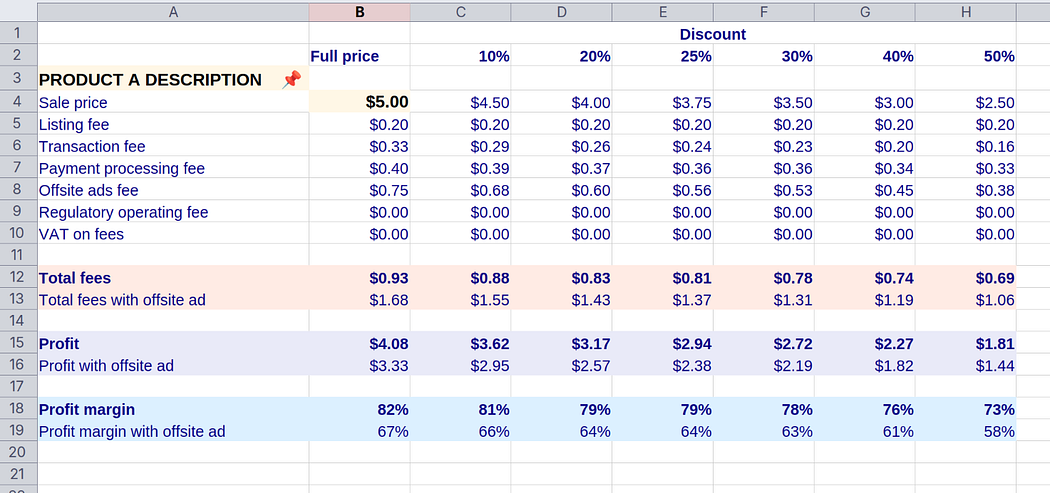
Screenshot of first sheet with input fieldsScreenshot of the first sheet where you input various fees and rates. 


On the first sheet, fill out the highlighted cells, using the Etsy documentation as a reference.

  1. Exchange rate
  2. Payment processing fees
  3. Offsite ads fees
  4. Regulatory operating fees (if applicable)
  5. VAT on fees (if applicable)

Step 3: Fill out your proposed product price and description


Screenshot of product fees sheetScreenshot of a product sheet. You enter the product description and price, and the spreadsheet calculates the fees and profit. 


On the second sheet, for Product A, choose a product price and update the product description.

You will see the fees update. Note that all the figures are in your shop’s local currency.

Repeat this for your other product types on the respective sheets (Products B and C).

Step 4: Note your profits


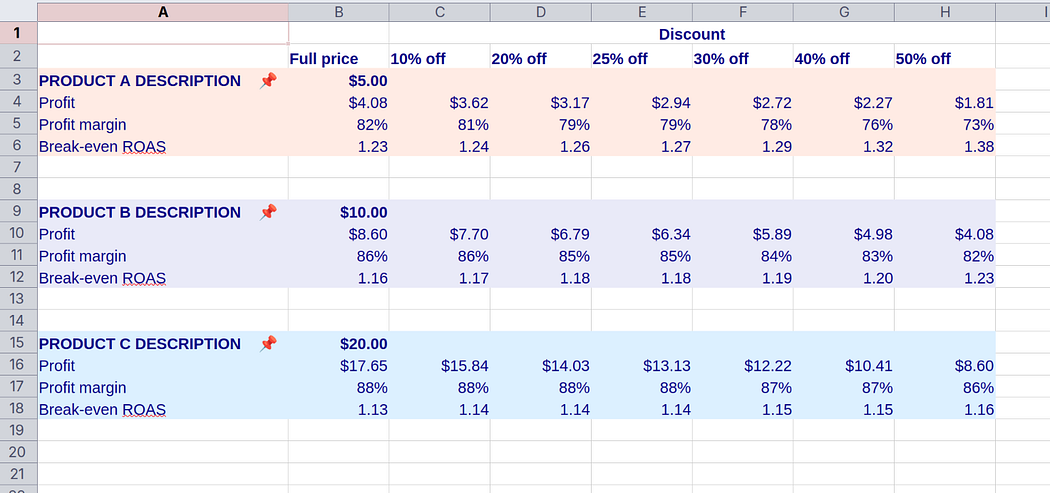
Screenshot of summary sheetScreenshot of summary sheet, showing profit, profit margin and break-even ROAS. 


On the Summary sheet, note the profits, profit margins and break-even ROAS (return on ad spend) for your different product types.

Step 4: Tweak your prices

If you like, you can go back and adjust your prices on the Fees sheets, and observe the effect on your profits.

Final thoughts

Knowing your numbers, your profit margins, is important for any ecommerce business.

I hope that the template I’ve provided will help you navigate Etsy fees and quickly and confidently calculate the profit margins for your products.

When it comes to pricing, profit margins are not the only consideration, however. For example, you will also take into account competitor pricing, perceived product value, and the value of your time.

Having said that, knowing your profit margins is a crucial step in ensuring a profitable and sustainable business.

If you have any questions about how to use this spreadsheet or how to price your products, pop them in the comments below or join my Etsy Digital Seller community and I’ll be happy to provide advice. If you have any feedback on the spreadsheet, please let me know!


Disclaimer: We have done our best to make the information in the spreadsheet and this blog post as accurate as possible. However, we make no guarantees that it is accurate or up to date. We take no responsibility for any errors or impacts on your business. Always be sure to consult the official Etsy documentation for the current information about Etsy fees.

Image

Most stories you hear from entrepreneurs are success stories.

But entrepreneurs fail a lot too.

Here is one of those stories.

Chapter 1: The lure of the tangible

About a year into my digital products shop, it was going well and I thought, wouldn’t it be great to sell physical products too? To see my work in a tangible, physical form… How cool would that be?!

So I did what any good Etsy seller would do and I started a print-on-demand (POD) shop using Printify.

It was a bit slow, but I did get some sales and even positive reviews.

Chapter 2: The problem

I didn’t fully realise it at the time, but this shop was a great cause of stress for me.

The biggest problem was quality control. I had ordered a few samples which looked ok, but I never knew what my customers would be getting.

Customers came to me with problems with misprints and incorrect sizing. Printify was good at correcting their errors and sending a replacement, but the whole thing left a bad taste in my mouth.

There were also problems with shipping and customers asking me where their order was. I had to deal with that too.

In about 50 orders, I think maybe 10 had issues outside my control and nothing to do with the quality of my designs. That’s a very high rate!

So I paused my shop to reconsider my options (and for some respite from the complaints!).

Chapter 3: A new hope

I did more research and heard that Printful seemed to have a good reputation for quality.

I decided to focus on a single product type which had sold the most. I ordered samples from Printful and was much happier with the quality.

But it was still really hard to match the colours from my designs to the actual product, so that I could make accurate mockups. Actually the colours were further off than they were with Printify, but the fabric quality was much nicer.

I decided I would just order every single design (in a patchwork-style sample) and then manually colour-correct my mockups based on those.

This turned out to be a bad decision.

Chapter 4: A slow death

My revamped shop was looking great and I was happier with my products, but my sales slowed right down (people preferred the poorer quality products?).

Printful’s prices were higher, so I needed to raise my prices too.

I think this was a problem.

The sales came in very slowly, while at the same time my new workflow was slow, tedious and expensive.

I wasn’t enjoying working on this shop, and I was questioning if it was worth continuing.

I reached out to a mentor and explained the situation. She told me to focus on what was serving me, my digital products shop.

She told me exactly what I wanted to hear, actually.

I closed the shop once again. To this day I dread selling physical products ever again.

Yet after all this time and effort, I didn’t feel like a failure. Am I delusional? Why not?

Chapter 5: The reckoning

I have come to accept that my strengths and weaknesses lie in certain areas.

But I don’t know what they are until I try.

I’ve seen successful POD shops with quite a few negative reviews that the seller appears to ignore. I think some sellers take these in their stride and keep going anyway.

I really hate getting negative reviews, and the stress of not knowing if a customer’s order was going to arrive on time, and in the right size, and well-printed, was too much for me.

I made the decision to stop that shop because I realised it wasn’t for me.

I had given it a year (on and off), and then called it.

But it’s hard to know whether to “keep going” (as I tell everyone in our Etsy Digital Seller community all the time!) or to call it a day. How do you decide?

Epilogue

If you’re finding yourself in a similar situation, I can sympathise as it’s not easy to make that decision. But you really need to look at all the facts and commit: keep going or stop.

While sunk cost fallacy starts to rear its ugly head the longer you’ve been trying something, I think you will feel comforted by knowing that you spent enough time and gave it your best.

On Etsy, I would say you need a minimum of 6 months to a year to know if your shop is going to work out.

So if you’re struggling to make sales or just not enjoying yourself, give it time and experiment. Try and make it fun.

But if you decide to quit, don’t beat yourself up.

This is all part of being an entrepreneur.