
I have a special freebie for you today! I’ve created a free Etsy fees and profit calculator spreadsheet that you can download below.
When starting your Etsy shop, you’ll need to figure out your pricing and profit margins. This is not straightforward as there are many different Etsy fees you need to take into account. But never fear, my spreadsheet makes this all easy.
The file is in Excel (XLSX) format, but you can also import it into Google Sheets or LibreOffice Calc and it will work there too.
Before I give you a quick run-through of how the spreadsheet works, I want to give an overview of what it includes.
To work out your profit, as a digital seller you only need to calculate your Etsy fees as you have no other cost of goods or shipping costs. Of course you may have marketing/ad fees on top as well.
What Etsy fees are there?
There are 5 types of Etsy fees, and here are their current values, as of 25 January 2026. Except for the listing fee which is charged at the point of listing the product, all other fees are charged only after making a sale. Links below are to the official Etsy documentation:
Listing Fee: $0.20 USD
Transaction Fee: 6.5% of product price
Payment Processing Fee: Varies by country and for domestic/international sales. For the US, it is $0.25 USD + 3% of product price
Regulatory Operating Fee: In certain countries
VAT on seller fees: In certain countries, in certain circumstances
How to use the spreadsheet
Step 1: Download the spreadsheet
Download your free Etsy Fee Calculator spreadsheet
Step 2: Fill out the fees and rate information
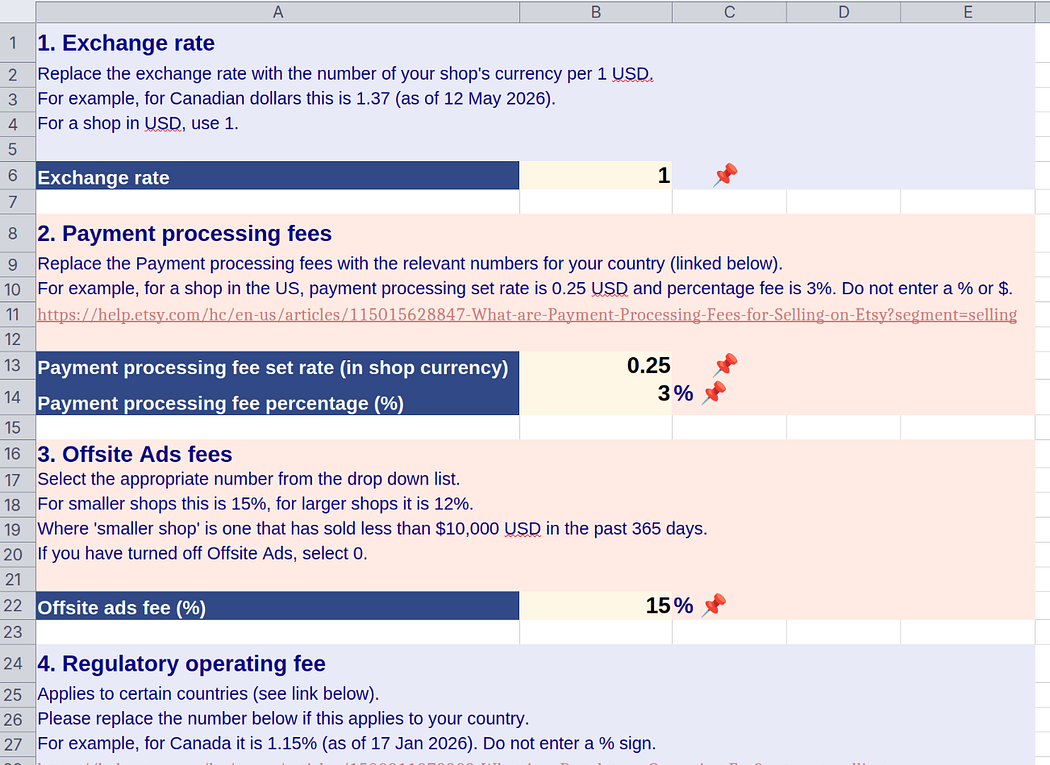 Screenshot of the first sheet where you input various fees and rates.
On the first sheet, fill out the highlighted cells, using the Etsy documentation as a reference.
- Exchange rate
- Payment processing fees
- Offsite ads fees
- Regulatory operating fees (if applicable)
- VAT on fees (if applicable)
Step 3: Fill out your proposed product price and description
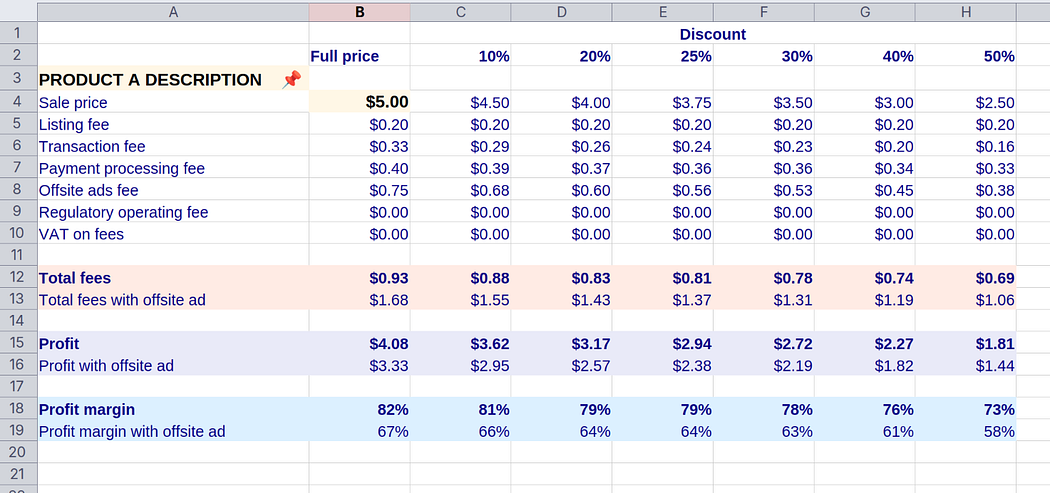 Screenshot of a product sheet. You enter the product description and price, and the spreadsheet calculates the fees and profit.
On the second sheet, for Product A, choose a product price and update the product description.
You will see the fees update. Note that all the figures are in your shop’s local currency.
Repeat this for your other product types on the respective sheets (Products B and C).
Step 4: Note your profits
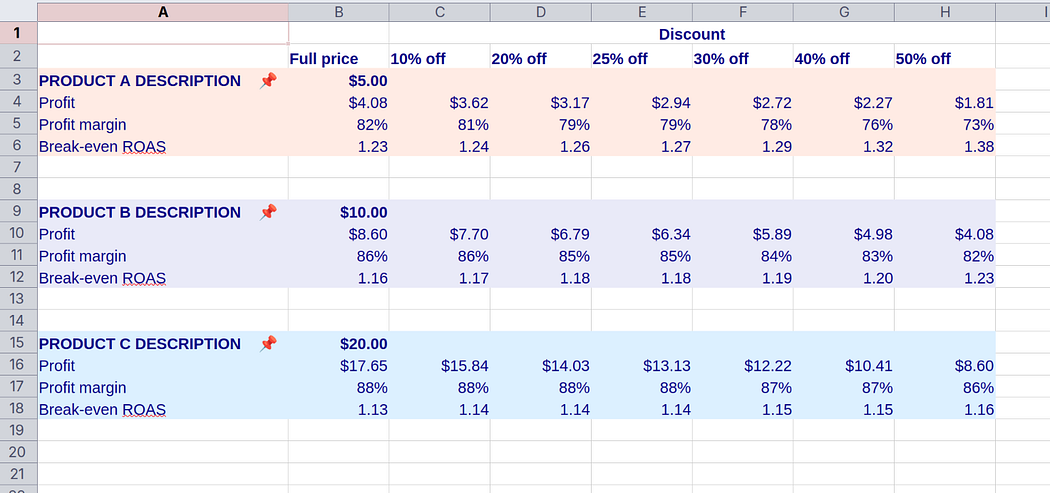 Screenshot of summary sheet, showing profit, profit margin and break-even ROAS.
On the Summary sheet, note the profits, profit margins and break-even ROAS (return on ad spend) for your different product types.
Step 4: Tweak your prices
If you like, you can go back and adjust your prices on the Fees sheets, and observe the effect on your profits.
Final thoughts
Knowing your numbers, your profit margins, is important for any ecommerce business.
I hope that the template I’ve provided will help you navigate Etsy fees and quickly and confidently calculate the profit margins for your products.
When it comes to pricing, profit margins are not the only consideration, however. For example, you will also take into account competitor pricing, perceived product value, and the value of your time.
Having said that, knowing your profit margins is a crucial step in ensuring a profitable and sustainable business.
If you have any questions about how to use this spreadsheet or how to price your products, pop them in the comments below or join my Etsy Digital Seller community and I’ll be happy to provide advice. If you have any feedback on the spreadsheet, please let me know!
Disclaimer: We have done our best to make the information in the spreadsheet and this blog post as accurate as possible. However, we make no guarantees that it is accurate or up to date. We take no responsibility for any errors or impacts on your business. Always be sure to consult the official Etsy documentation for the current information about Etsy fees.